eEarth for CD/DVD ROM & iMapRoamer for internet
|
|
3D Browser Overview eEarth for CD/DVD ROM & iMapRoamer for internet |
|
Image filtering and highlighting -- interactive data analysis The "Image Pixel Study" feature allows users to observe longitude/latitude and elevation values of pixel under the cursor. The "Image Filter" feature further enables users to specify filter conditions to apply to elevation data, including Below, Above, Equal, Not Equal, and Between operators. Filtered image display offers grayscale and highlight options. As well, highlight color can be opaque or transparent.
Examples of "Image Filter" use include:
|
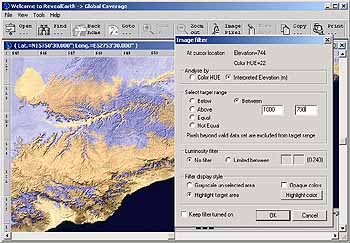
Figure: In transparent purple, locations with elevation between |
|
Location oriented 3D Engine
3D Browser is a client end application developed by InforShell that superimposes large RS imagery and environment data (retrieved from database) to present a seamless geographic information platform. Via this software end users can perform interactive 3D environment analysis and visualization. A variety of distributed data can be visualized by 3D Browser, for example, DEM, Vegetation Indices, Leaf Area Index.
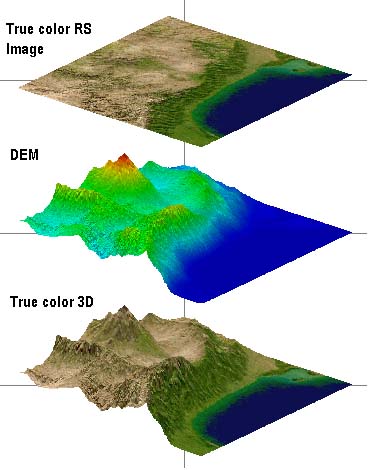
An existing 3D Browser application is InforShell's Earth 3D 1KM True Color RS Image & DEM Database. Imagery and elevation data points are mapped together as illustrated below:
|
|
|
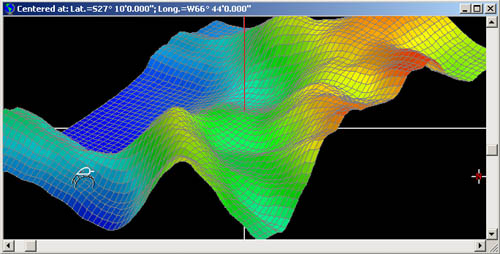
3D Elevation Visualization -- interactive 3D analysis The "Image Elevation 3D Study" feature opens an interactive 3D visualization display window, in which a 60km square plot can be freely rotated or enlarged via control of the mouse. Returning to the original window, the mouse can be used to navigate, and dynamically refresh the 3D plot in real time with a new region of data. The "Select 3D Options" feature further enables users to precisely control 3D plot style to optimize it's illustrative effect. For example:
(1) Changing color of bars, background, grid-display or lightness;
|
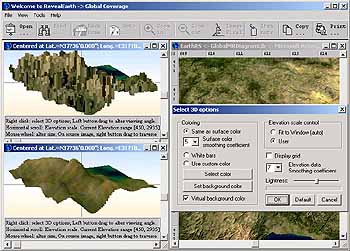
Figure: Comparing before and after elevation data |
|
Location oriented interactive 3D analysis
|
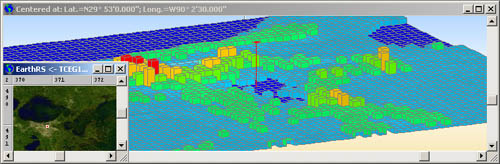 Figure: Flatland area (New Orleans .USA) 3D bar graph mode to enable exact comparison of elevation data per pixel
|
|
Location Specific Notes -- adding notes to geographic background at desired positions. Users can easily embed notes, tracks or images into the satellite image, which can be saved into files for easy storage.
Example uses for embedding notes and tracks: Notes or images acquired on site can be embedded within location markers (symbols) placed over the geographic background. Users can organized/categorize these notes by saving them into files on his/her computer. Thus different sets of notes can be prepared for different scenarios. This note/track feature is a simple means to made additions to the geographic platform. For creating advanced distributed networks, users may consider Inforshell product GADB-Shell, a backend data management studio.
|
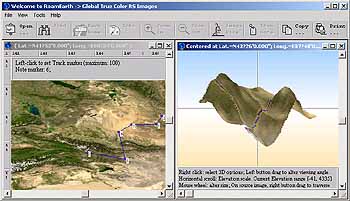
Figure: User track added |
|
Third party plug-in DLLs
Easy integration of third party data processing algorithms (using plug-in DLLs) to facilitate dynamic 3D visualization of private data analysis results.
Benefits: |
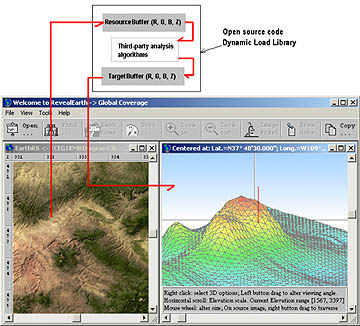
Figure: Third party plug-in DLLs |
|
|